
Bringing Our Clients’ Dream Features to Life: Account Snapshot Edition
Why we stopped guessing what account data you need, and put all of it one click away from anywhere in Green Check
The data is always somewhere else
Compliance work runs on account facts. How much did this business sell last quarter? Are cash deposits climbing? When does the license expire? Is a SAR outstanding on the account? Whether you’re approving an application, completing a monitoring review, or conducting a risk assessment, the answer usually lives in a different part of the app than the one you’re in.
We saw this up close while working with one of our clients on our new Risk Assessment product. Their current assessment lives in a spreadsheet (one we’re converting into Green Check’s new model). As they walked us through it, one thing kept coming up: to answer a single question about a single account, they had to jump between several areas of the app. They’d check sales data in one place, deposits in another, and license details somewhere else, then go back to the spreadsheet to type it all in.
Most of the time spent on each account’s risk assessment went to tracking down data.
We stopped trying to guess
Our first instinct was the obvious one: figure out which data points matter for a risk assessment and show them right on the form. But, then we looked at how differently our clients actually rate risk and found that no two institutions ask the same questions. One weighs cash as a share of deposits most heavily. Another cares more about licensing history or negative news. A question that needs sales trends at one bank needs FinCEN filing history at the next. Any set of fields we hard-coded would be right for a few clients and wrong for most of them.
So instead of guessing what you might need, we built something that shows you the whole picture, whenever you need it…
Meet the Green Check Account Snapshot
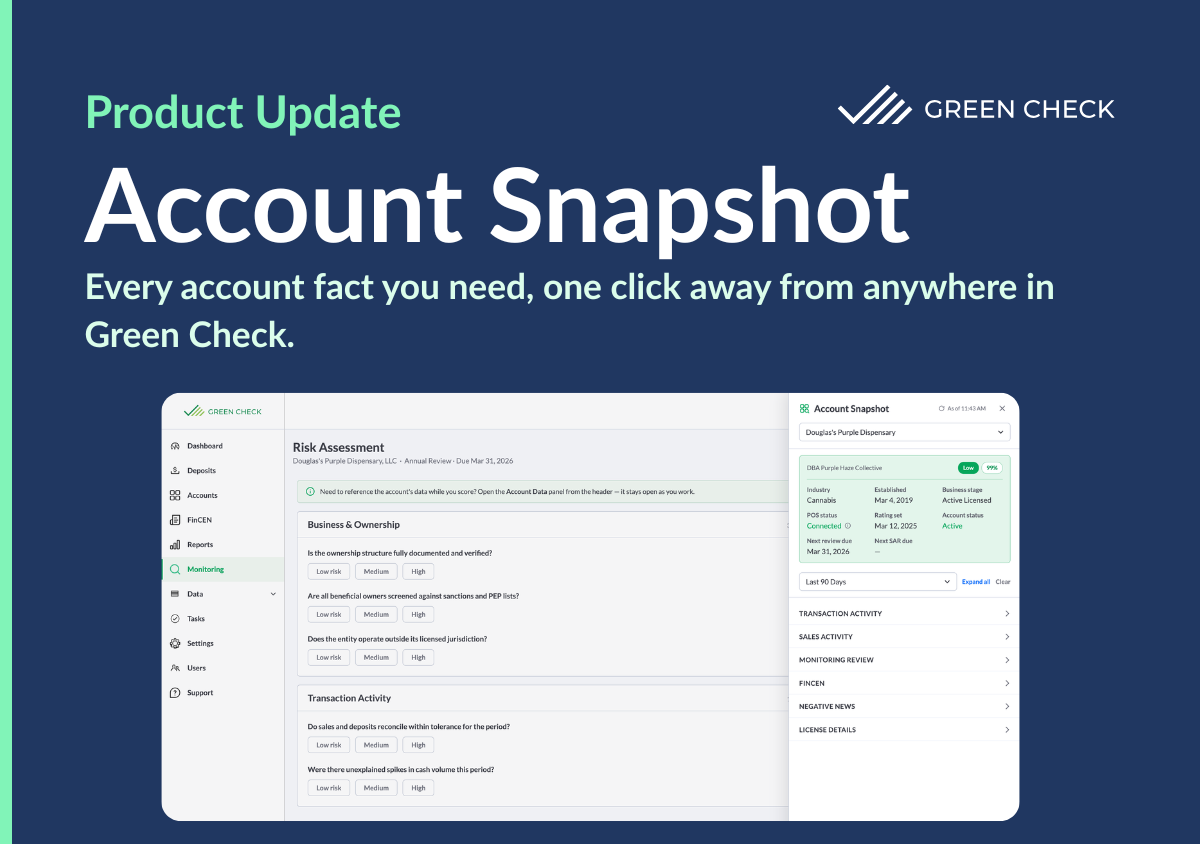
Account Snapshot is a panel you can open from the header on any page in Green Check. Pick an account, pick a time frame, and you get a clean, current view of that account without leaving the page you’re on. It stays open while you work, so you can reference it as you score, review, or write.
Here’s what you’ll see:
- Sales and transaction trends: How activity is moving over time and whether it’s up or down from the prior period
- License and business details: The core facts about who the business is and whether it’s in good standing
- Monitoring and reporting history: Where the account stands on reviews and FinCEN filings
- Things that needs attention: The signals worth a closer look, surfaced right up front
Time frames run from the last 7 days through year to date, or you can set a custom range. Compare last week to last quarter and you’ll see right away whether a cash spike is a pattern or a one-off.
One click away, wherever you are
Risk assessments are where we first saw the problem, but they’re far from the only place it shows up. Compliance work is full of moments where you need one answer about one account, fast:
- Scoring a risk assessment with real data in front of you
- Writing a monitoring review and checking whether deposits line up with reported sales
- Completing a SAR and confirming the activity trend over the last 90 days
- Reviewing an application or renewal and checking license status and expiration
- Prepping for an exam and pulling review and filing information for a specific account
- Answering a quick question from leadership without building a report
That’s why Account Snapshot lives in the header, not inside a single workflow. Wherever you are in Green Check, the data is one click away.
Built by listening
Account Snapshot exists because a client took the time to show us how their work actually gets done, not just what their spreadsheet says. That one walkthrough changed what we built. Instead of a narrow fix for one form, we shipped something every user can lean on, every day.
We strive for every feature to start like this. The people who live this work know where the friction is and it’s our job is to listen closely and build what actually removes it.
If you’re a Green Check client, you’ll soon be able to open the Account Snapshot from the header and pick an account to get started. Have an idea for what it should show next? We want to hear it.


